
Mriia Ecosystem
AI-powered unified state education ecosystem of Ukraine
#EdTech Case Study2026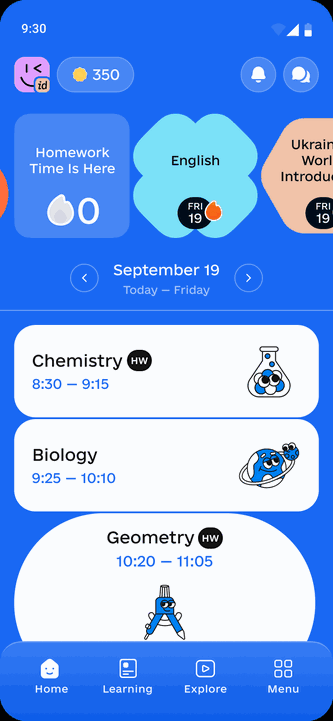
Mriia Ecosystem
The case shows how AMEDIA builds a state education ecosystem at national scale: a single environment from kindergarten to graduation, integrated with state education data registries, with intelligent modules that take routine work off educators and personalise each learner's trajectory.
01 — OVERVIEW
Mriia accompanies the educational process from kindergarten to high-school graduation and helps define a personalized educational trajectory for each learner. Mriia is not a set of separate services, but a unified AI-powered state education ecosystem that combines a mobile app for families, learners and educators, a web portal for educational institutions, integrations with state education data registries and intelligent AI modules.
Purpose of the ecosystem
To bring daily learning workflows, school and preschool administration, communication, educational content, extracurricular opportunities and preschool education into one digital environment.
What Mriia changes
It reduces paperwork, makes education data available by roles, supports personalized child development and creates a unified interaction loop between educational institutions and families.
02 — ECOSYSTEM MODULES
One ecosystem, four directions

Mriia App. School
Daily mobile experience for students, parents and educators: day plan, schedule, grades, homework, attendance, notifications, secure communication, educational content, clubs and competitions.
Mriia App.Preschool
Preschool context for parents of preschool children and educators: child day, activities, messages, lesson planning, digital attendance and reduced paperwork.

Mriia Web Portal
Working environment for school and preschool administrations and educators: institution setup, classes / groups, users, roles, journals, schedules, reporting, analytics and integrations.
Intelligent layer: AI powered
For school — content and extracurricular recommendations. For preschool — an AI lesson-plan constructor. AI helps personalize the trajectory, reduce routine work and improve educational-process quality.
03 — ANALYTICS AND SCALE
04 — MRIIA APP. SCHOOL
Mobile experience for students, parents and educators
The school direction of the Mriia App is a single entry point for everyday interaction between families and schools. Data created in the web portal by educators and administrations becomes available in the app according to the user role: student, parent, teacher or administration.
Student
Day plan, schedule, homework, grades, attendance, comments, Mriia ID, gamification, content, clubs and competitions.
Parents
Child progress dashboard, learning dynamics, absences, absence notes, notifications and secure communication with the school.
Teacher
Work with the digital journal, grading, homework, notes, lesson materials, comments and communication.
School
Institution profile, classes, user roles, academic periods, schedule, analytics, reporting and EIS synchronization.
AI for the School direction
Content recommendations
CMS-driven cold start for each role, dynamic adaptation after interest selection and content interaction, viewed-video handling after 80% completion, video-series logic and A/B testing of approaches.
Extracurricular recommendations
Personalized discovery of activity categories, external and school clubs, and competitions based on interests, age, format, price, provider and geolocation.
Personal trajectory
Content, clubs, competitions and activities help the student see not only current learning tasks, but also development opportunities aligned with interests.
Key digital processes of the school app
05 — MRIIA APP.PRESCHOOL
Mobile educational process from the first day in kindergarten
Mriia.Preschool expands the ecosystem beyond school and creates a digital experience for preschool institutions, preschool educators and parents. The direction is being piloted in 40 kindergartens across six regions of Ukraine and covers different implementation contexts: large cities, remote communities and frontline areas.
For parents
Information about the child's day, activities, messages from educators, communication with the preschool and access to useful child-development content.
For educators
Digital attendance, lesson and activity planning, notifications, basic reporting, communication with parents and tools that reduce paperwork.
For preschool institutions
Groups, educators, roles, journals, communication, attendance and prerequisites for integrating preschool data into a unified education ecosystem.
AI for Preschool: AI lesson-plan constructor
From a blank page to a plan
A preschool educator receives a recommended or generated lesson plan based on selected parameters, inserts it into the lesson-plan module, regenerates the result and leaves feedback.
Methodological alignment
The tool supports age adaptation, lesson structure, alternating activity formats and helps follow methodological requirements.
Reduced routine work
Preparing a lesson plan from scratch can take around 2 hours. The target result is to reduce preparation time to less than 10 minutes.
Pilot statistics
06 — MRIIA WEB PORTAL. SCHOOL
Administrative core for school management, data and educational workflows
Mriia Web Portal is a working environment for educational-institution administrations and educators. It combines management of the institution profile, classes, users, schedules, journals, grading, attendance, homework, reporting and interaction with the app for students and parents.
Institution setup
School profile, structure, academic periods, operating parameters, connection and implementation support.
Classes and users
Management of classes, students, parents, educators, roles, access rights and data verification.
Learning process
Schedule builder, curriculum planning, digital journal, grades, attendance, homework, lesson notes and files.
Analytics and reporting
Overview of teacher and class performance, semester grades, reports, attendance and data for management decisions.
App interaction
Delivery of schedule, tasks, grades, absences, comments, messages and lesson materials to the mobile app by roles.
Integrations and data
Electronic information exchange with AIKOM 2.0, other EIS solutions and the Mriia database to keep education data up to date.
Key digital processes in the web portal
07 — MRIIA WEB PORTAL. PRESCHOOL
Administrative environment for preschool institutions, educators and parents
The web portal also includes the preschool direction. It supports the preschool institution profile, groups, educators, roles, activity planning, attendance, messages, basic reporting and synchronization of data with the mobile experience of parents and preschool educators in Mriia.Preschool.
Preschool profile
Configuration of the preschool institution, groups, pedagogical staff, roles, operating parameters and pilot connection.
Planning and journals
Activity planning, digital journals, activity records, attendance, messages and basic reporting.
Family communication
Delivery to parents of information about the child's day, activities, educator messages and useful content.
AI lesson-plan constructor
Generation, recommendation, regeneration, insertion into the lesson-plan module and post-generation feedback from the educator.
How the preschool loop works
Preschool connects
The administration configures the profile, groups, educators, roles and basic parameters in the web portal.
Educator plans
The educator manages activities, journals, attendance and, when needed, uses the AI lesson-plan constructor.
Data reaches the family
Parents see information about the child's day, messages, activities and useful content in the app.
Routine work decreases
Paper processes are replaced with digital actions, while lesson plans are prepared faster and more methodically.
Mriia.Preschool pilot
08 — DATA, AIKOM 2.0 AND INTELLIGENT LAYER
How Mriia connects state education data, web portal, app and AI
Distribution of AI functionality by direction
School
Content recommendations: CMS-driven cold start, personalization after interest selection and interactions, viewed-content handling, video-series logic, A/B testing and quality metrics.
School / Extracurricular
Activity recommendations: categories, external clubs, school clubs and competitions based on interests, age, format, price, provider and geolocation.
Preschool
AI lesson-plan constructor: generation, recommendation, regeneration, insertion into the lesson-plan module, feedback, age adaptation and methodological quality.
Methodological note — what is AIKOM 2.0
AIKOM is an automated information complex for education management — an EMIS-class system used to process state electronic information resources and personal data in education within a unified integrated environment. In this document, AIKOM 2.0 is treated as the modern state education-data layer with which EIS Mriia interacts to update, synchronize and store education information.
Interaction loop
Institution configures data
A school or preschool configures its profile, structure, classes / groups, users and roles in the Mriia Web Portal / EIS.
Data synchronizes
EIS Mriia interacts with AIKOM 2.0 and other connected EIS solutions to keep education data up to date.
Educators manage workflows
Journals, schedules, grades, attendance, homework, lesson plans, materials and comments are managed in the web portal.
Families see results
Students and parents receive an up-to-date day plan, learning results, tasks, absences, messages and content in the app.
AI personalizes experience
Recommendation modules select content and extracurricular activities, while the AI constructor helps preschool educators create lesson plans.
Analytics supports decisions
Administrations and the state receive higher-quality data for management, planning and education-policy development.
09 — RELIABILITY, CONTROL AND PROVEN RESULT
Unified ecosystem for everyday education workflows
Role-based access control
Students, parents, teachers, preschool educators and administrations of schools and preschools work only with the data and functionality relevant to their role.
Secure communication
Signal-based chats and centralized notifications create a unified secure communication channel between the educational institution and the family.
AI source control
The AI lesson-plan constructor works with predefined units rather than arbitrary topics, reducing the risk of incorrect content.
Recommendation stability
Pagination without duplicates, exclusion of already shown results, viewed-content handling and quality metrics help keep recommendations useful.
Scalability
The ecosystem is designed with horizontal scaling, schools of different sizes and expansion to preschool education in mind.
Continuous development
The product evolves based on user feedback and gradually develops preschool, extracurricular activities, content, AI and analytics directions.
Key advantages of the unified ecosystem
From kindergarten to graduation
Mriia forms a long digital journey for the child: from preschool age to high-school completion.
Less bureaucracy
The web portal, journals, schedules, reporting, lesson plans and notifications reduce paperwork for educators.
Transparency for families
Parents and students see results, tasks, attendance, comments, activities and messages in one app.
Personal trajectory
Content, clubs, competitions and AI recommendations help discover opportunities that match the learner's interests and age.
Mriia already operates as a national education ecosystem: hundreds of thousands of users, thousands of connected schools and tens of millions of education actions in the system demonstrate implementation scale.
The expansion to Mriia.Preschool and the inclusion of AI modules moves the ecosystem from process digitalization to intelligent support for learning, development and preschool planning.
10 — TECHNOLOGY STACK
Technology requirements for the Mriia ecosystem
Technology lifecycle
Versions of programming languages, frameworks, libraries and system services must have EOL no earlier than the contract signing date + 6 months.
Scalability
Development must consider future horizontal scaling and growth in the number of users and education actions.
Web compatibility
The web part of the system is compatible with popular web accelerators, including Nginx. HTML layout follows the W3C HTML5 standard.
Secure access
HTTPS is used together with role-based access control and secure data transfer.
Mobile platform
Android
Kotlin, Java, Compose UI, Jetpack, Hilt, Room, Retrofit, Signal SDK, SQLCipher, Protobuf.
iOS
Swift 13+, CocoaPods, SnapKit, LibSignalClient, SignalCoreKit, CoreData, EncryptedCoreData, Combine, SwiftProtobuf, RxSwift, RxCocoa, Starscream, UI Kit, Alamofire and others.
Backend, frontend, data and infrastructure