Construction Start Notice
Submitting a notice of construction start through the Diia app
#GovTech Case Study2026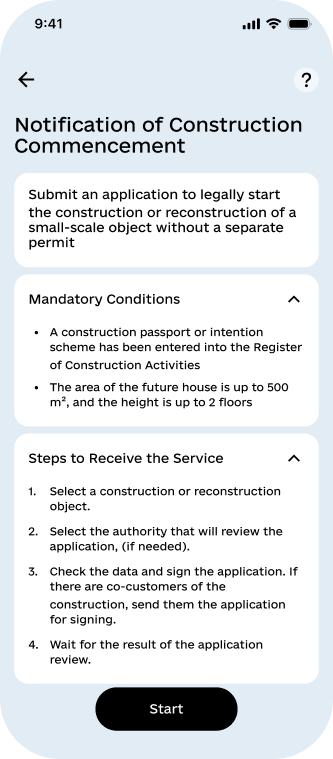
Construction Start Notice
The case shows how AMEDIA turns a mandatory step before building a private home into an automated public service: the application is generated from a state registry, signed remotely by all co-owners and registered without any official involvement.
01 — OVERVIEW
A notice generated from the registry, not filled in by hand
Construction Start Notice is a public electronic service within the Diia ecosystem, delivered in the Construction Services section of the Diia Portal mobile app. Its full name is "Notice of the start of construction works on the basis of a construction passport".
The service lets an individual submit the notice on the basis of a construction passport or a development intent scheme, sign it with Diia.Signature and receive the review outcome as a PDF — with no paper form and no visit to an administrative service centre or a building-control authority.
Purpose of the product
Turn a mandatory pre-construction procedure into a self-service electronic process in which data comes from the registry and correctness is checked before signing, not after submission.
What the product changes
The application is generated automatically from data held in the e-Construction system: the user does not fill in fields but reviews pre-populated data and signs it, and where the property has co-owners every co-applicant signs remotely, via a link or a QR code.
02 — WHO IT'S FOR
Private builders, co-owners and control authorities
Primary audience
Individuals intending to begin construction of a detached single-family, garden or summer house of no more than two storeys and up to 500 m², outbuildings, garages, and landscaping on the land plot — together with co-applicants named as co-owners.
Eligibility conditions
A Diia user aged 18 or above, a verified taxpayer registration number, an active Diia.Signature with an NFC-capable device, a construction passport or development intent scheme registered in the e-Construction system, and no legal entities among the co-applicants.
Review authorities
The State Inspectorate of Architecture and Urban Planning or the local building-control authority — determined by the registry from the administrative district of the property; where several are returned the user chooses, as both hold identical powers.
03 — THE PROBLEM IT SOLVES
A mandatory step that used to cost weeks
The construction start notice is a mandatory step between receiving a construction passport and actually starting work — without a registered notice, construction is considered unauthorised. Before the service, it worked like this:
An in-person visit to a service centre or control authority with a paper form
Self-verification and manual transfer of construction passport data into the application
A separate visit by every co-owner of the object in order to sign
Waiting for the outcome with no visibility of the review status
04 — CORE FUNCTIONALITY
Eight capabilities behind a four-step flow
Eligibility checks
Taxpayer number, age, Diia.Signature, availability of construction documents and registry availability are checked before an application is created.
Construction project selection
Construction documents are grouped automatically by unique address, so the user picks a project rather than a file.
Construction document selection
A construction passport or a development intent scheme; the screen opens only when two documents exist at one address or a document contains errors, with an explanation of why it cannot be used.
Review authority selection
Shown only when the registry returns several authorities for the administrative district; where one is returned, the system determines it automatically and the step is skipped.
Automatic application generation
The application and its PDF are generated from current e-Construction system data and shown on a read-only confirmation screen.
Signing and co-applicants
Signing with Diia.Signature by the applicant and every co-applicant, with invitations by link, QR code or push, a signature status screen and the option to decline.
Statuses and details
Application list and statuses — sending, not sent, in processing, registered, rejected — with creation date, construction project, document and the reason for any rejection.
Results and accessibility
Viewing and downloading the PDF of the application and of the review outcome, in a Ukrainian-language interface aligned with DSTU EN 301 549:2022.
05 — HOW THE PRODUCT WORKS
Four steps for one applicant, six with co-owners
The user journey from opening the service to receiving the outcome:
Eligibility
The user opens the service in the Construction Services section and the system runs eligibility checks.
Documents
The system retrieves available construction documents from the e-Construction system and builds a list of construction projects.
Project
The user selects a construction project; the document screen opens only if two documents exist or one contains errors.
Authority
The registry determines the review authority — automatically where one is available, by user choice where several are returned.
Application
The system generates the application and its PDF from e-Construction system data and opens the confirmation screen.
Signing
The user signs with Diia.Signature; where co-applicants exist, the initiator shares a link or QR code and signatures are collected.
Submission
Once all signatures are collected, the application is pre-validated in the e-Construction system and submitted for review.
Outcome
The registry returns the outcome — the status updates and the user receives a push notification and the result PDF.
06 — APPLICATION LIFECYCLE
Eight states, each visible to the user
Internal technical states are kept separate from the statuses shown to the user:
Application created
Generated from e-Construction system data; the user reviews it before signing — data confirmation screen.
Awaiting signatures
The initiator has signed; co-applicant signatures are collected within 72 hours — "Awaiting signature".
Sending
The application is pre-validated and submitted; on failure, retries run for up to 24 hours — "Sending".
Submission failed
The application failed pre-validation or could not be delivered — "Not sent" with the reason.
In processing
Accepted by the e-Construction system, with the outcome pending — "In processing".
Registered
The notice is registered and the outcome document is available — "Registered" with a PDF.
Rejected
A negative outcome has been returned with the grounds for refusal — "Rejected" with the reason.
Cancelled
The initiator cancelled the application or the 72-hour signing window expired — a new application can be submitted.
07 — STATISTICS AND SCALE
The ecosystem the service enters
08 — PRODUCT ADVANTAGES
What changes for the applicant and for the state
Speed
Submission is reduced to four steps in the app instead of an office visit with a paper form.
Zero manual entry
The application is generated from e-Construction system data and the user only reviews and signs it.
Remote co-owners
Signing via a link or QR code removes the need for a joint visit by every co-owner.
Fewer refusals
Pre-validation catches errors before signing rather than after submission.
Transparency
The application status is visible at every stage and a push arrives on every key event.
Permanent access
PDFs of the application and the result are held in e-Construction system registries.
Less load on offices
A routine request no longer requires in-person intake or manual checks by service centres and control authorities.
Measured, not estimated
A built-in model of 10 metrics records every status change with a timestamp, so stage durations are measured.
09 — INTEGRATIONS
Nine systems behind one application
The service module in the app connects to the registry, the signature service and the Diia platform services:
e-Construction system — primary source of data on the document, project and land plot; determination of review authorities, pre-validation, registration, status and outcome document
Diia.Signature — application of the qualified electronic signature by the applicant and each co-applicant
id.gov.ua — user identification and authentication, secure access to personal data
State Tax Service — verification of applicant and co-applicant taxpayer numbers as a condition of access
BankID — demographic attributes for anonymised product analytics
Diia Portal profile service — retrieval of co-applicant names for display to the user
Link and QR code service — generation of signing invitations for co-applicants
Notification module — push notifications on status changes and expiry of the signing window
Logging subsystem — recording of actions, integration errors and key operations for security and diagnostics
10 — TECHNOLOGY STACK
Open source, modular, registry-driven
A discrete functional module within the Diia Portal on a client–server model, separating the application and interface layers, with thin-client access.
Open source technologies only, with no need for additional licences.
A workflow engine; internal technical states are kept separate from the product statuses shown to users.
REST API exchanging JSON in UTF-8; Bearer Token (JWT) authorisation with mTLS and allowlist where required; tracing via X-Correlation-Id.
Document-oriented storage of applications with full status history for analytics and process recovery.
Containerisation, deployment to Kubernetes, change delivery through CI/CD; horizontal scalability and modular additions.
Protection of the client–server channel, access segregation, logging at system and application level, compliance with the Law on Personal Data Protection.
Correct handling of e-Construction system outages and timeouts without losing application data or incorrectly changing a confirmed status.
The Diia design system, iOS and Android apps, NFC for Diia.Signature, Ukrainian localisation and accessibility under DSTU EN 301 549:2022.
11 — PROVEN RESULT
A procedure reduced to four to six self-service steps
A procedure that required a visit to a service centre or control authority and separate attendance by every co-owner is reduced to four to six self-service steps; automatic pre-validation reduces refusals caused by incomplete data, and automatic registration in the e-Construction system shortens the time before works can begin.
The domain already works at scale — Ukrainians used construction services on the Diia portal more than 200,000 times as of March 2025 and around 300,000 construction documents had been issued online by August 2026 — and the service metrics are target operational requirements from the technical specification, to be confirmed once the service launches in the app.