Diia.Office
A digital system for organizing employment in government authorities and public-sector organizations
#GovTech Case Study2026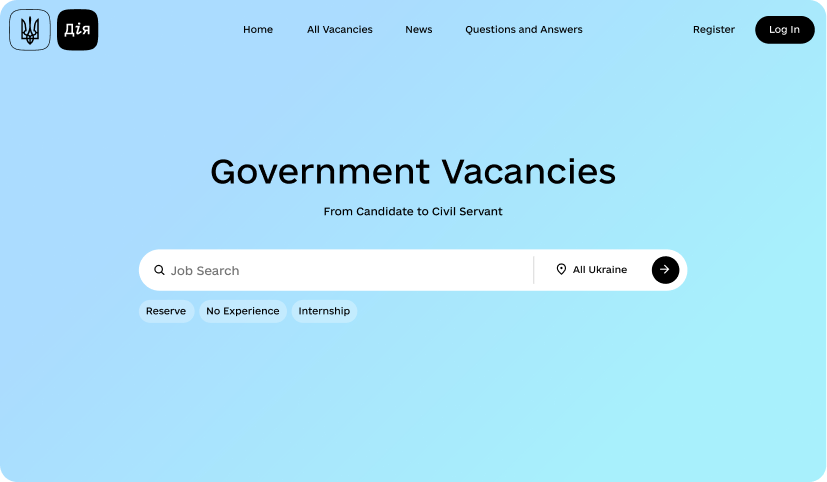
Diia.Office
The case shows how AMEDIA builds a single digital framework for public-sector recruitment: public job search and the internal HR processes of government organisations operate as one product, with defined roles, statuses, deadlines and digitally signed documents.
01 — OVERVIEW
Public job search and internal HR in one system
Diia.Office is a digital system for managing recruitment in government authorities and other public-sector organisations. The product brings employers and candidates together in a single process: from publishing a vacancy and submitting a CV to conducting the selection process, making a decision and publishing a hiring announcement.
The public-facing part operates on the Diia Portal, while employers’ HR processes are managed through the Diia.Office accounts of authorised officials.
Purpose of the product
Create a digital process that provides transparent and controlled recruitment for different public-sector organisations.
What the product changes
Each action is performed according to the user’s role, while the vacancy and the candidate move through defined statuses in sequence, with data from government registers used for automatic entry and verification.
02 — WHO IT'S FOR
Candidates, employers and administrators in one role model
Candidates and public users
People searching for public-sector vacancies, creating a CV, applying for a vacancy and receiving notifications on the Diia Portal.
HR specialists and managers
Authorised employees of hiring organisations who prepare vacancies, process candidates and conduct the selection process.
Administrators
Technical administrators, National Agency of Ukraine on Civil Service (NAUCS) administrators, administrators of Category A positions and organisation administrators who manage access, roles and data.
03 — THE PROBLEM IT SOLVES
Fragmented public-sector recruitment process
Without a single system, vacancies, applications, interview results and HR decisions may be processed through different channels, making it more difficult to:
Monitor deadlines and statuses
Coordinate between HR specialists, managers and candidates
Verify data
Ensure compliance with standardised selection rules
Generate analytics
Inform candidates
04 — KEY CAPABILITIES
Eight capabilities across the hiring cycle
Organization and user management
Registration of a hiring organisation, automatic retrieval of legal entity data from the Unified State Register, employee registration, role assignment and access control.
Vacancy management
Creating a draft announcement, specifying requirements, payment terms and place of work, adding a selection plan, approval, publication and closing.
Candidate CV
A structured electronic CV with education, language proficiency, work experience, competencies and special conditions; education data can be retrieved from EDEBO.
Vacancy search and subscriptions
Browsing and filtering vacancies by location, organisation, position category and family, with subscriptions configurable from daily to monthly.
Application submission
A candidate applies with a completed CV; the system checks the vacancy and CV and forwards the application to the organisation for review.
Selection process
Reusable selection templates with interviews, testing, practical tasks and other formats, each with a description, assessment criteria and a minimum passing score.
Decision and appointment
Review of all stage results, a decision on the candidate, an official PDF document signed with a qualified electronic signature, and processing of the appointment application.
Public information and analytics
Current vacancies, hiring organisations, appointment announcements, news, a knowledge base, FAQs and aggregated analytical indicators.
05 — HOW THE PRODUCT WORKS
From a published vacancy to a published appointment
Six steps that a vacancy and a candidate go through in sequence:
Vacancy
An organisation prepares an announcement, submits it for approval and publishes it.
CV
A candidate creates a structured electronic CV, with education data retrieved from EDEBO.
Application
The candidate applies for a vacancy; the organization accepts the application or rejects it with a reason.
Selection
The candidate goes through the stages of the selection process — an interview, testing or a practical task.
Decision
An authorised employee reviews the results, makes a decision and signs an official PDF document with a QES.
Appointment
The candidate submits an application for appointment, and the appointment announcement is generated and published.
06 — SCALE AND RESULTS
The scale of the civil service
07 — VALUE FOR CANDIDATES
A clear path to employment in the public sector
One place to search
A single place to search for public-sector vacancies.
Structured CV
A structured electronic CV that can be reused for different vacancies.
Data from registers
Education data is retrieved automatically from EDEBO.
Subscriptions
Subscriptions based on the candidate’s own criteria, from daily to monthly.
Transparent status
The application status is visible in the account and sent by email.
Remote appointment
The application for appointment can be submitted remotely, without visiting the organisation.
08 — VALUE FOR THE GOVERNMENT
Scaling recruitment without scaling manual work
Unified rules
Unified rules for preparing vacancy announcements across organisations.
Centralised processing
Candidate processing is centralised in one system.
Control of deadlines
Responsible employees and deadlines are monitored, with automatic reminders.
Reusable templates
Selection templates are created once and reused.
Verified data
Data is verified through government registers, and HR documents are signed securely.
Hiring analytics
Aggregated analytics on vacancies, applications and appointments by region, category and organization.
09 — PROCESS AUTOMATION
Operations that do not require a separate decision
Diia.Office automates operations that do not require a separate decision by an official; if an application remains unreviewed, the responsible person receives an automatic reminder on the second working day:
Retrieving organization data from the Unified State Register
Verifying education information through EDEBO
Retrieving military registration information
Updating the statuses of vacancies, applications and appointment applications
Creating tasks for responsible employees
Sending reminders about unprocessed applications
Sending notifications to candidates and employers
Generating PDF documents
Applying a qualified electronic signature
Updating public analytics
10 — TECHNOLOGY STACK
Implementation technologies
Liquio — BPMN engine, form builder and registry-based data model.
TypeScript, NestJS, RabbitMQ.
React, Redux, Angular.
PostgreSQL.
Ingress, Kubernetes.
Grafana.
Cryptographic data protection, electronic identification, qualified electronic signature (QES), BankID, Diia.Signature.
Unified State Register, EDEBO, military registration data and state identification services.
11 — PROVEN RESULT
Public-sector hiring as a structured process
Diia.Office provides a single digital recruitment framework for the public sector and connects public job search with the internal HR processes of organisations, covering employer registration, vacancy management, CV management, selection, HR decisions and appointments.
As a result, public-sector recruitment moves from fragmented actions to a structured process with defined roles, statuses, deadlines and digital documents.